MemGallery
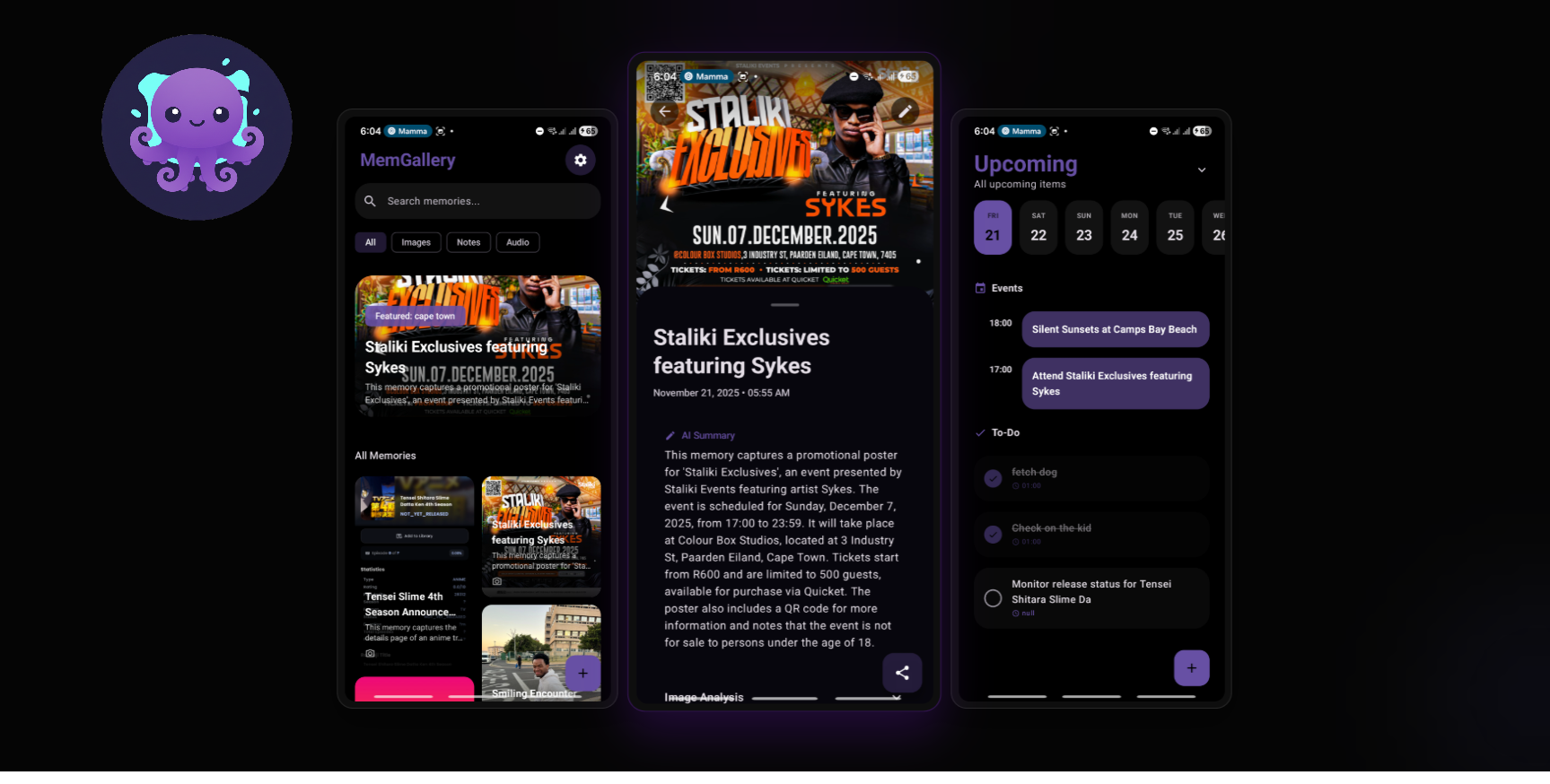
MemGallery is an AI-powered memory assistant Android app that democratizes brand-exclusive features like OPPO's Mind Space and Nothing's Essential Space, bringing automatic screenshot detection, multimodal capture, and semantic search to any Android 7.0+ device.
The Problem: Great Ideas Locked Behind Brand Walls
If you've ever seen someone using a Nothing Phone tap their Essential Key to instantly capture inspiration, or watched an OPPO user summon Mind Space to analyze their screen, you know the feeling. That moment of "I wish my phone could do that."
These apps are brilliant. They use AI to capture, analyze, and organize everything you see on your screen—transforming fleeting moments into searchable, actionable memories. But there's a catch: they only work on specific phone brands.
- Mind Space (OPPO/OnePlus): AI-powered screen analysis and note-taking, exclusive to OPPO and OnePlus devices
- Essential Space (Nothing): Multi-modal capture hub with a dedicated hardware button, only on Nothing phones
- Pixel Screenshot (Google Pixel): Advanced screenshot functionality with AI recall, locked to Pixel devices
What if you don't own these phones? What if you have a Samsung, Xiaomi, Motorola, or any other Android device? You're out of luck.
That's why I built MemGallery.
What is MemGallery?
MemGallery is an AI-powered memory assistant that brings the magic of brand-exclusive apps to any Android device running Android 7.0 or higher. It's your external brain—automatically capturing, processing, and organizing everything you want to remember.
The Core Idea
Think of it as a combination of:
- The automatic screen capture of Pixel Screenshot
- The AI analysis of Mind Space
- The multi-modal capture of Essential Space
- But universal—working on any Android phone
What It Does
MemGallery captures your memories in four ways:
- Screenshots (automatically detected and processed)
- Photos (camera capture or shared from other apps)
- Audio recordings (voice notes with AI transcription)
- Text notes (quick thoughts and selected text from any app)
Once captured, Google's Gemini 2.5 Flash AI analyzes everything—extracting meaning, generating descriptions, detecting actionable items (events, todos, reminders), and making your memories searchable through natural language.
No more scrolling through hundreds of screenshots looking for "that thing about the coffee shop meeting." Just search: "screenshot about coffee shop meeting" and MemGallery finds it instantly.
Why I Built It
The Inspiration
I first encountered Mind Space on a friend's OnePlus device. Watching them press a button, analyze their screen, and save everything with AI-generated summaries was eye-opening. Then I saw Nothing's Essential Space with its dedicated hardware key for instant capture. Finally, Google's Pixel Screenshot showed how AI could make old screenshots searchable.
I wanted these capabilities on my phone. But I didn't want to buy a new device just for one app.
The Opportunity
This project gave me a chance to:
- Solve a real problem: Build something I genuinely needed
- Improve my Android development skills: Deep dive into modern Android architecture
- Master Kotlin: Write production-quality Kotlin code using best practices
- Explore the Google Generative AI SDK: Work with cutting-edge AI capabilities
- Learn Jetpack Compose: Build beautiful, modern UIs declaratively
- Understand background processing: Master WorkManager, ContentObservers, and foreground services
Building something you'll actually use every day is the best way to learn.
How I Built It
The Architecture
MemGallery follows MVVM (Model-View-ViewModel) architecture with a clean separation of concerns:
UI (Jetpack Compose)
    ↓
ViewModels (State Management)
    ↓
Repositories (Business Logic)
    ↓
Data Sources (Room + Gemini API)
Key Technologies:
- Jetpack Compose: Modern declarative UI framework
- Hilt/Dagger: Dependency injection for clean, testable code
- Room Database: Local storage for memories and tasks
- DataStore: Secure settings and preferences
- WorkManager: Reliable background processing
- Kotlin Coroutines + Flow: Asynchronous operations and reactive data
- Google Generative AI SDK: Gemini 2.5 Flash integration
The Screenshot Challenge
The most interesting technical challenge was automatic screenshot detection. When you take a screenshot, MemGallery needs to:
- Detect it immediately (using a
ContentObserverwatchingMediaStore) - Filter false positives (only files containing "screenshot" in the name)
- Copy to app storage (before the original might be deleted)
- Process in the background (without draining battery)
- Handle network failures (retry with exponential backoff)
Here's how it works:
// 1. ScreenshotObserver watches for new media
contentResolver.registerContentObserver(
    MediaStore.Images.Media.EXTERNAL_CONTENT_URI,
    true,
    screenshotObserver
)

// 2. When detected, enqueue expedited work
val workRequest = OneTimeWorkRequestBuilder<MemoryProcessingWorker>()
    .setInputData(inputData)
    .setExpedited(OutOfQuotaPolicy.RUN_AS_NON_EXPEDITED_WORK_REQUEST)
    .build()

// 3. Worker processes with foreground service
MemoryProcessingWorker.doWork() {
    copyFileToAppStorage()
    savePendingMemory()
    processWithGemini()
    sendActionNotifications()
}
This ensures screenshots are captured immediately, even if the app is closed, while handling edge cases like airplane mode or API rate limits.
The AI Integration
Integrating Gemini AI required careful prompt engineering and structured output handling:
Multimodal Input:
val parts = mutableListOf<Part>()

// Add image
if (imageUri != null) {
    val resizedBitmap = resizeBitmap(bitmap, 1024) // Optimize for API
    parts.add(Part.fromBytes(imageBytes, "image/jpeg"))
}

// Add audio
if (audioUri != null) {
    parts.add(Part.fromBytes(audioBytes, "audio/m4a"))
}

// Add context
parts.add(Part.fromText("""
    Analyze the provided content. Current time: $currentDateTime.
    Generate JSON with: title, summary, tags, image_analysis,
    audio_transcription, and detected actions (events/todos).
"""))
Structured Output: I defined a JSON schema to ensure consistent responses:
{
  "title": "string",
  "summary": "string",
  "tags": ["string"],
  "actions": [{
    "type": "EVENT | TODO | REMINDER",
    "description": "string",
    "date": "YYYY-MM-DD",
    "time": "HH:MM"
  }]
}
This guarantees the AI returns parseable, actionable data every time.
The UI/UX Polish
Modern users expect premium design. MemGallery uses Material Design 3 with:
- Dynamic color theming (Material You)
- AMOLED pure black mode (battery saving on OLED screens)
- Smooth animations (shared element transitions)
- Staggered grid layouts (Pinterest-style memory browsing)
- Bottom sheets (contextual actions)
- App shortcuts (long-press icon for quick actions)
Every interaction feels polished—from the gradient memory cards to the smooth calendar transitions in the task screen.
The Results
What Works
✅ Automatic screenshot indexing: Every screenshot is captured, analyzed, and searchable
✅ Multimodal capture: Images, audio, and text all processed seamlessly
✅ Smart action detection: AI finds events and todos, sends notifications
✅ Semantic search: Find memories by describing them naturally
✅ Task management: Detected actions become manageable tasks with deadlines
✅ Works everywhere: Any Android 7.0+ device (98%+ of active Android phones)
✅ Privacy-first: All data stored locally, you control your API key
Real-World Usage
In daily use, MemGallery has become my second brain:
- Meeting notes: Screenshot Zoom chat → AI extracts action items → Reminders set automatically
- Learning: Screenshot code examples → AI categorizes by language → Searchable reference library
- Shopping: Voice note "buy coffee beans" → Transcribed, tagged, searchable
- Ideas: Quick text notes → AI generates summaries → Never lose a thought
Performance Metrics
- Processing speed: ~3-5 seconds per image (including API roundtrip)
- Battery impact: Minimal (uses expedited workers, not constant polling)
- Storage: ~2MB per 100 memories (compressed images, optimized JSON)
- API costs: Free tier covers ~50 screenshots/day (1,500/month limit)
What I Learned
Building MemGallery taught me:
- Background processing is hard: Race conditions, network failures, Android battery optimization—every edge case matters
- AI is powerful but unpredictable: Always validate outputs, handle failures gracefully
- User experience is everything: Technical excellence means nothing if the UI feels clunky
- Testing matters: Bugs in background services are nightmare to debug
- Modern Android is amazing: Jetpack libraries make complex features approachable
What's Next
MemGallery is currently in Alpha v0.0.3. Here's what's coming:
Short-term
- 🧪 Comprehensive testing: Unit and integration tests for reliability
- 🔐 Enhanced security: Encrypted API key storage
- 📦 Build optimization: ProGuard/R8 for smaller APK size
- 📊 Better analytics: Usage insights (privacy-respecting)
Long-term
- 🔍 True semantic search: Embedding-based similarity search
- 🌐 Cross-device sync: Optional cloud backup (end-to-end encrypted)
- 📱 Smart widgets: Home screen memory previews
- 🎯 Custom AI models: Fine-tuned for specific use cases
- 🔗 Integrations: Notion, Evernote, Google Calendar
Community
The project is open source (MIT License) on GitHub. Contributions welcome!
Try It Yourself
MemGallery is available now:
- Download the latest APK from GitHub Releases
- Get a free Gemini API key from Google AI Studio
- Grant permissions (camera, storage, notifications)
- Start capturing memories!
No account required. No subscriptions. No data collection. Just your memories, enhanced by AI, searchable forever.
Final Thoughts
Brand-exclusive features shouldn't exist in 2025. Great software should work on your device, not force you to buy a new one.
MemGallery proves that with modern Android development tools—Jetpack Compose, Kotlin Coroutines, Hilt, WorkManager—and accessible AI APIs like Gemini, one developer can build brand-quality experiences in a few months.
This project started as "I wish my phone could do that." It became a full-featured, production-ready application that I use dozens of times daily.
If you've ever felt locked out of cool features because you don't own the "right" phone, I hope MemGallery shows you: you can build it yourself.
Links
- GitHub: Past-da-king/MemGallery
- Pages: mem gallery website
- Releases: Download APK
- Documentation: Project Website
- Issues: Report Bugs / Request Features
MemGallery - Your external brain, always remembering.
Built with
Related work
- mcp3Calculon is a real-time, conversational math chatbot powered by Google Gemini and a decoupled Modular Calculation Protocol (MCP)…
- rednexaNexa is a capstone project that addresses the critical issue of limited internet access in rural and township communities…
- portfolioA sophisticated, self-updating portfolio platform built on Next.js and TypeScript…